
Feature

AI presentation maker for research: slides from papers with citations and speaker notes

Describe a topic or pick papers in your sources and type “make a presentation”. scid.ai shows a slide plan, builds a PPTX with speaker notes and puts a source under every claim. Not a template with stock images, but a talk you can defend in front of a committee or your lab.
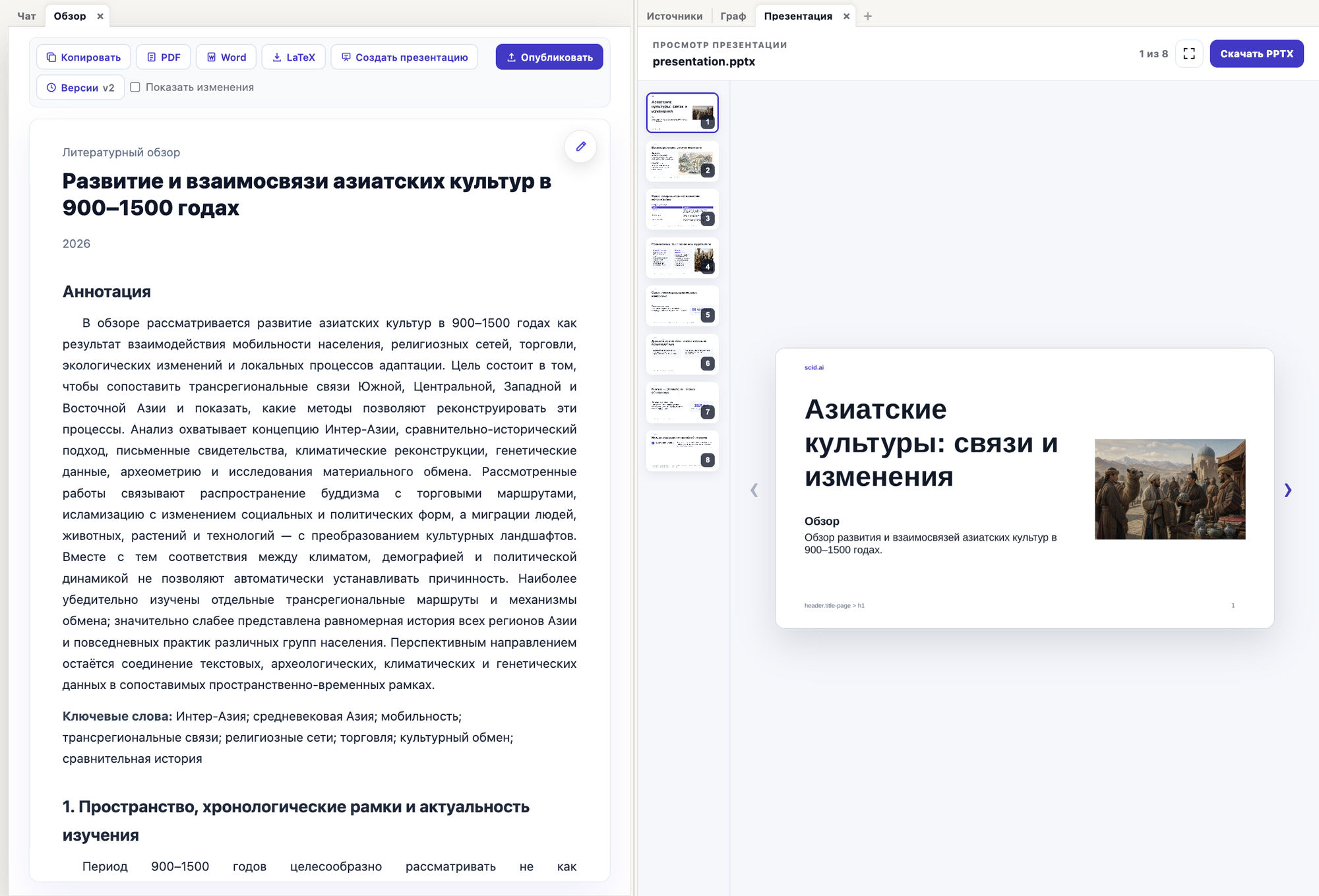
A literature review in scid.ai and the Presentation tab with slide previews and a Download PPTX button
Presentation next to the reviewSlides built from a literature review: preview in the browser, PPTX downloads right away.

From review to slides in one click

The document has a “Create presentation” button: a literature review or a paper turns into a talk, and the document's sources become the sources of the slides. The finished presentation opens in a tab next to the chat: flip through the slides, check the wording and download the PPTX.

How scid.ai builds a presentation

The presentation is made in the same research chat where you search for papers and write reviews. Slides rest on the publications found or selected by you, so every substantive claim can be checked against a source rather than the model's memory.

  1. Describe the task. “Make a presentation on…”, “build slides from this paper”, “turn the review into a 12-slide talk”. If papers are already in the sources panel, the slides are built from them.
  2. Review the plan. scid.ai first shows the structure: the title and content of each slide. Describe changes in the chat, then press “Approve and create”.
  3. Wait for the build. Source selection, text, design, optional illustrations and a quality check run step by step; the status is visible in the card.
  4. Download the PPTX. Preview the slides in the browser and download the file. Speaker notes and source references are already inside.

What the slides can be built from

  • From a topic: scid.ai finds peer-reviewed papers and builds the talk on them.
  • From one paper: open its page by DOI and press “Make a presentation”; the paper goes into your sources.
  • From a literature review or document you have already prepared in scid.ai.
  • From a report in Reports mode: “make a presentation from this report”.
  • From an uploaded PDF or DOCX: a file from the library becomes the source of the slides.

How this differs from Gamma, SlidesAI and other presentation generators

General-purpose generators make good-looking slides from your text or a short prompt. They do not search scientific sources and do not check where the numbers came from: an invented fact lands on the slide with the same confident design.

scid.ai starts from sources. Papers come from OpenAlex and Crossref, DOI references go onto the slides and into the speaker notes, and you see the plan before the build and can fix it. The design is simpler than Gamma's, but the talk survives the question “where is this from”.

The interface, slides and notes work in English and Russian. Detailed comparisons: scid.ai vs Gamma and scid.ai vs SlidesAI.

Which talks it suits

  • Thesis or dissertation defense: relevance, literature review, method, results, novelty.
  • Conference or seminar talk: 10–15 slides with one idea per slide and references to colleagues' work.
  • Journal club and paper walkthroughs: question, method, results, limitations, relevance for your group.
  • Project or grant progress report: the state of the field and what has been done, with verifiable sources.
  • Lecture or class: the topic structured by publications rather than by a single textbook.

Limitations worth knowing

  • Design: one universal scid.ai template. Corporate brand styles are not supported yet.
  • Illustrations are AI-generated: conceptual images and diagrams. Charts from your own data must be added by hand.
  • Check numbers and wording against the sources: that is what the references on the slides and in the notes are for.
  • The free plan offers the fast mode without illustrations and a daily presentation limit.
  • The finished file is edited in PowerPoint or Keynote: text tweaks and slide order are easier there.

Frequently asked questions

What format is the finished presentation?

PPTX. The file opens in PowerPoint, Keynote, Google Slides and LibreOffice, and the slides can be previewed in the browser.

Can I make a presentation from one specific paper?

Yes. Open the paper's page by DOI in scid.ai and press “Make a presentation”: the paper goes into the chat sources and the prompt is filled in for you.

Where do the sources on the slides come from?

From the scid.ai scientific search over OpenAlex and Crossref, or from the papers and files you selected in the sources panel. DOI references go onto the slides and into the speaker notes.

What are the Fast and Quality modes?

Fast gives simple slides sooner. Quality spends more steps on slide design and refinement and can add illustrations; it is available on paid plans.

Build your first presentation on your topic

scid.ai finds the papers, shows a slide plan and prepares a PPTX with speaker notes and source references.

Make a presentation